Management

The Management page lists all management records in which this location
resides. Note that if a location has been added to the LOCATIONS tab of
the Management profile, then that management record appears here.
TO ASSOCIATE A MANAGEMENT RECORD
WITH THIS LOCATION:
- From the Location Profile page, click the MANAGEMENT tab on the
left.
- Click the ADD button.
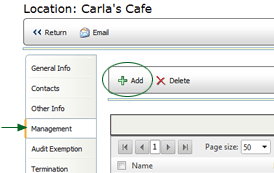
- Select the Relation Type, then click the NEXT button.
- From the list of management records, select the name of the record
in which this location resides.
- Click SAVE. The management record is added to the list.
TO REMOVE A MANAGEMENT RECORD:
- From the Location Profile page, click the MANAGEMENT tab on the
left. A list of all management records associated with this location
is displayed.
- Check the box beside the management record that you want to remove.
(Do not click on the management record name. Clicking on the record
name opens that management profile page. Instead, you just want to
select the management record.)
- Click the DELETE button. You will be asked to confirm that you
want to delete the association. The management record is removed from
the list.
