Adding a New Training Session to the Schedule

To create a new training schedule:
- Click the NEW button.
- Click the CALENDAR button to open a calendar, then select the date
of the training.
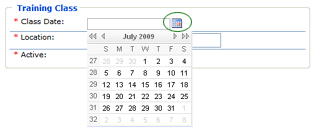
- Enter the LOCATION of the training.
- Indicate whether the training is active or not. You may want to
set up the training schedule in advance, and then come back to this
dialog later and make it active. Note that only active training sessions
are available when you schedule training for a location.
- Click SAVE.
