ARCHIVING AN AUDIT FORM
GO TO: Administration | Audit | Audit Forms
You may not conduct an audit using an audit form that has been archived. In addition, results from audits conducted on forms that have been archived are no longer available to be included in reports.
To archive an audit form:
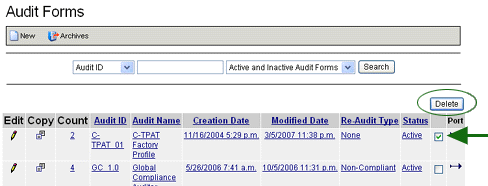
- Select the at the end of the table (far right). You may select multiple audit forms to archive at the same time.
- Click the DELETE button. This process removes the selected audit forms from the list and places them in an archive folder; it does NOT permanently delete the forms. Audit forms deleted in this manner may be restored.
To restore an archived audit form:
- Click the ARCHIVES button. All archived forms appear in the list.
- Select the audit form that you want to restore. (Click the corresponding checkbox at the end of the column
 .)
.)
- Click the RESTORE button.