My Subscriptions (L1 and L2)

Clicking MY SUBSCRIPTIONS menu option displays a list of all reports to which you are currently subscribed. From this window you can manage existing subscriptions. You can edit the prompts used to execute the report, or you can remove a subscription from the list (unsubscribe).
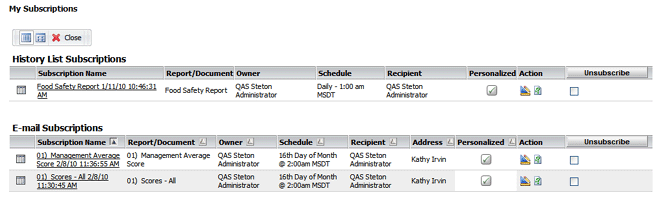
There are two types of subscriptions:
- Email Subscriptions - the report is automatically emailed to a designated recipient according to the schedule you specify.
- History List Subscriptions - the report is automatically run at a specified time and then stored in memory for 24 hours, so that it is immediately available for viewing later that day. Once the report has been run, it is easily accessible on the HISTORY LIST page.
From the MY SUBSCRIPTIONS page, you may:
- View a report in the list - Click on the report name to view the report.
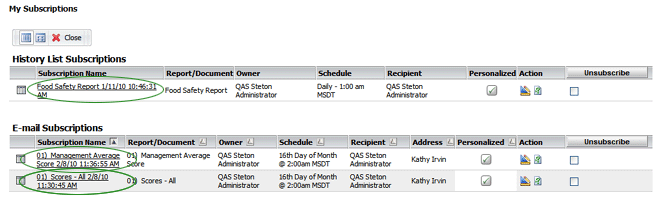
- Delete a subscription - Click the corresponding box on the far right to select the report, then click the UNSUBSCRIBE button.

- Edit a subscription in the list - Click the EDIT button. This allows you to edit any of the parameters of the subscription, including the prompts used for the report.

- Personalize a subscription in the list - Click the PERSONALIZE button
 to change the prompts. This allows you to “personalize” the prompts for this email subscription.

See Creating Subscriptions for information on creating email and history list subscriptions.
