
 |
When you create
an Active Home Page, it is generally the best practice to assign
the Active Home Page to a Role. That will ensure that anyone who
is assigned to that Role will see the Active Home Page when they
log in.
However, if you have a user that is assigned to multiple roles and each role has a different Active Home Page assignment—such as an administrator—we recommend that you assign the preferred Active Home Page at the User level. Setting this at the User level will override any Role assignments and priorities. See To Assign an Active Home Page to a User. |
After you have created and assigned widgets to an Active Home Page, you can assign it to one or more Roles (or Users).
To assign an Active Home Page to a Role:
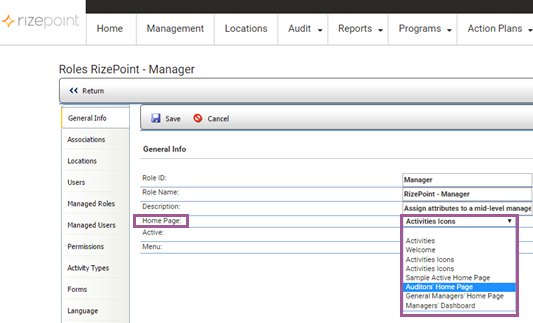
 |
To ensure that you have assigned the Active Home Page to the Role properly, log in as a User assigned to this Role. The Active Home Page assigned to the Role should display with the widgets you created for the Role. |
To assign an Active Home Page to a User:
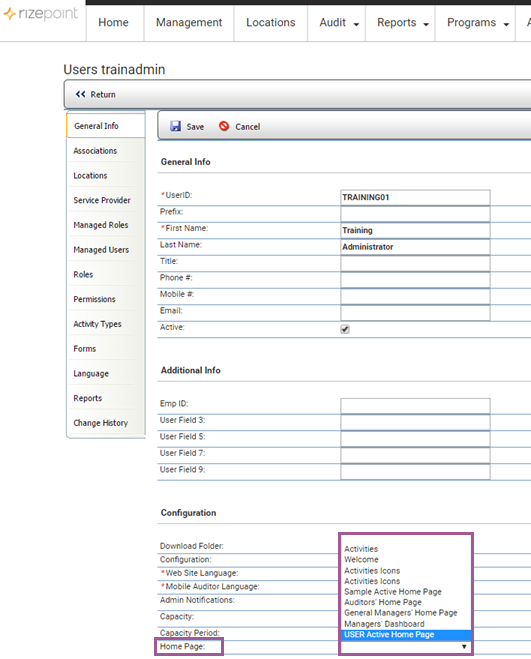
|
To ensure that you have assigned the Active Home Page to the User properly, log in as this User. The Active Home Page assigned to the User should display with the widgets you created for that specific person. |
See Deleting an Active Home Page.
